There is a small mistake in calculator of windows operating system
1) Press (windows + R) in your keyboard.
2) Type calc then calculator appears check for error now.
3) Find the solution for sqrt(4) -(minus) 2 = 0 (your answer).But in this calculator you will get such a long solution. check it
This may be a problem with the calculator algorithm....
11/08/2010


10/05/2010
Basic NETWORKING
These everyone is knowledge of basic networks i just want to elaborate in detail explanation how does this work.........and put in to our real world as well as real time projects we deal with.
So guys first we have to learn some basic concepts here..about the physical media we normally use to connects pc's together or certain modems, switches , routers, etc,.
So now let us first study about Networking cables
This three types of wiring need crimping tool make at your home. This crimping tool costs you around $6 works just for 200 pins accurately later it starts ruining which doesn't show effective results while making. Better buy the best company which will help you working with more pins
This is to be done with RJ (Registered Jack) - 45 on both sides of the wire.This jack costs you around 0.1$(per jack) a good DLINK jack for better durability will cost you around 0.3$.
1) Straight through -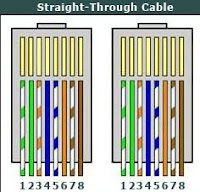 Generally this type of cable are used for connecting unlike devices. Such as
2) Roll over - This type of cable is completely reverse of Straight through.Rollover cables, also called Yost cables . Such as
1 - 8
2 - 7
3 - 6
4 - 5
5 - 4
6 - 3
7 - 2
8 - 1
3) Cross over : This type is generally used for like devices most commonly but in some cases we also use it for unlike not so imp and not practically correct.Such as
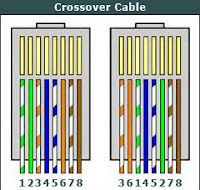
Connecting a computer to a router Connecting a computer to a computer Connecting a router to a router Connecting a switch to a switch Connecting a hub to a hub
PIN ORDER:
1 - 3
2 - 6
3 - 1
4 - 4
5 - 5
6 - 2
7 - 7
8 - 8
So guys first we have to learn some basic concepts here..about the physical media we normally use to connects pc's together or certain modems, switches , routers, etc,.
So now let us first study about Networking cables
This three types of wiring need crimping tool make at your home. This crimping tool costs you around $6 works just for 200 pins accurately later it starts ruining which doesn't show effective results while making. Better buy the best company which will help you working with more pins
This is to be done with RJ (Registered Jack) - 45 on both sides of the wire.This jack costs you around 0.1$(per jack) a good DLINK jack for better durability will cost you around 0.3$.
1) Straight through -
 Generally this type of cable are used for connecting unlike devices. Such as
- Connecting a computer to a router
- Connecting a computer to a computer
- Connecting a router to a router
- Connecting a switch to a switch
- Connecting a hub to a hub
PIN ORDER:
1 - 1
2 - 2
3 - 3
4 - 4
5 - 5
6 - 6
7 - 7
8 - 8
1 - 1
2 - 2
3 - 3
4 - 4
5 - 5
6 - 6
7 - 7
8 - 8
2) Roll over - This type of cable is completely reverse of Straight through.Rollover cables, also called Yost cables . Such as
 connect a device to a router or switch’s console port

1 - 8
2 - 7
3 - 6
4 - 5
5 - 4
6 - 3
7 - 2
8 - 1
3) Cross over : This type is generally used for like devices most commonly but in some cases we also use it for unlike not so imp and not practically correct.Such as

PIN ORDER:
1 - 3
2 - 6
3 - 1
4 - 4
5 - 5
6 - 2
7 - 7
8 - 8
Now a small and brief example for you CONNECTING TWO PC's
Step 1 : Both the pc's must be under same operating system( win 7(this os doesn't work properly for networking as well as wifi,vista,win xp).
Step 2 : Make both pc's to be under same workgroup i mean you to change the name of the workgroup.(go to my computer properties and change the workgroup setting)
Specific path here " Control Panel\System and Security\System "
Step 3 : Now connect them with cross over cable and give the IP address for the both systems go to adapter settings and open properties of local area connection click on TCP/IPV4 properties again here in the right of the lan properties.
Step 4 : First pc click on use the following ip address 192.168.1.1 and for the Second pc click on use the following ip address 192.168.1.2 and now restart both the systems.
Step 5 : Go to start and click on network see whether another pc name appears there or not. If not use this software http://ipmsg.org/index.html.en
ENJOY !!!
Step 1 : Both the pc's must be under same operating system( win 7(this os doesn't work properly for networking as well as wifi,vista,win xp).
Step 2 : Make both pc's to be under same workgroup i mean you to change the name of the workgroup.(go to my computer properties and change the workgroup setting)
Specific path here " Control Panel\System and Security\System "
Step 3 : Now connect them with cross over cable and give the IP address for the both systems go to adapter settings and open properties of local area connection click on TCP/IPV4 properties again here in the right of the lan properties.
Step 4 : First pc click on use the following ip address 192.168.1.1 and for the Second pc click on use the following ip address 192.168.1.2 and now restart both the systems.
Step 5 : Go to start and click on network see whether another pc name appears there or not. If not use this software http://ipmsg.org/index.html.en
ENJOY !!!
9/26/2010
How to get internet access to 2 Pc's.
Hi Frdz...i have very great discussion with you now i have just created a home network with my pc as server and one laptop connected to my pc with a lan network.There are few steps to be followed here.
Step 1: Get a lan wire (RJ45 male pin - cross over cable) or prepare it using crimping tool.
Step 2: Should have two female RJ45 pins on the PC motherboard if not do this.
Get an intex internal NIC card with for Rs.160 and install it to ur PCI slot given in your motherboard and install the given software with in the box.
Step 3: Connect any broadband internet to your motherboard RJ45 female jack from your modem(Straight through).
Step 4: Now connect another wire cross over cable from NIC card on the back of your PC to the laptop or another PC.
Step 5: Switch on both computers and now go to 1st PC and open RUN command and type "ncpa.cpl" when opened right click on the local area network click for sharing and restart your both pc's now check one connection for both system.This forms a gateway between two systems
ENJOY
Step 1: Get a lan wire (RJ45 male pin - cross over cable) or prepare it using crimping tool.
Step 2: Should have two female RJ45 pins on the PC motherboard if not do this.
Get an intex internal NIC card with for Rs.160 and install it to ur PCI slot given in your motherboard and install the given software with in the box.
Step 3: Connect any broadband internet to your motherboard RJ45 female jack from your modem(Straight through).
Step 4: Now connect another wire cross over cable from NIC card on the back of your PC to the laptop or another PC.
Step 5: Switch on both computers and now go to 1st PC and open RUN command and type "ncpa.cpl" when opened right click on the local area network click for sharing and restart your both pc's now check one connection for both system.This forms a gateway between two systems
ENJOY
Subscribe to:
Posts (Atom)